


Palmstreet: Buy & Sell LIVE
4.6624.00 Reviews
App Specs
- Version
- 8.90.0
- Updated On
- License
- Free
- Downloads
- 100,000+
- Developer
- Plant Story
- Categories
- House & Home
- Platform
- Android, iOS
Screenshots
 Analysis by AppCompare
I judge a shopping app by a few practical questions: can I understand what is being sold, can I ask about it before committing, and does the format suit how I actually like to shop? Palmstreet: Buy & Sell LIVE makes the most sense when the live presentation matters as much as the item itself. It is a free House & Home app from Plant Story, rated Everyone, with a 4.7 average from around 3,800 ratings and over 100,000 installs. That gives a new user a useful sense of its reach, but the real decision is whether watching sellers present products feels more helpful—or more distracting—than browsing a conventional marketplace.
Choose the shopping style before you choose the app
Live shopping asks for a different kind of attention than scrolling through static listings. A stream can let you see an item handled and ask a question while the seller is there, but it also asks you to be present at a particular moment. If you prefer to compare several listings quietly, save possibilities, and decide later, a standard marketplace may be a better fit. If you like seeing an item demonstrated and having a conversation around it, Palmstreet’s format has a clearer advantage.
I’d also separate two reasons to use it. You might arrive with a particular kind of item in mind, or you might simply enjoy discovering things through sellers’ live presentations. The first calls for patience: a product may not be available when you open the app. The second suits the format naturally, because browsing streams can turn a spare moment into a social shopping session. Knowing which one describes you helps keep the experience enjoyable rather than making it feel like a slow search tool.
Who is likely to get the most from it?
The strongest match is someone who values context and conversation while shopping, especially when seeing an item in motion or asking about its details helps them decide. It may also appeal to sellers who enjoy presenting what they offer directly instead of relying only on written listings. The app’s community element is part of the point: following sellers and returning to their streams can make discovery feel more personal than a one-off search.
On the other hand, I would not make this my only option for a time-sensitive purchase, a tightly specified shopping list, or a product that I need to compare across many sellers quickly. Live sessions can be engaging, but they are not the same as an always-available catalogue. Anyone who dislikes video, prefers quiet browsing, or does not want to make decisions while a stream is moving should feel no pressure to use this format. A conventional listing-based app or a local shop can be the more comfortable choice.
The Thrill of Live Shopping
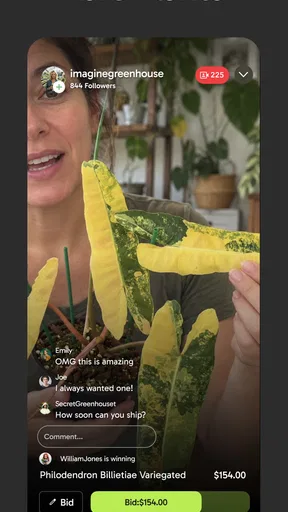
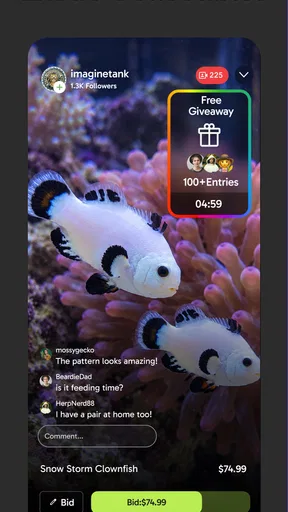
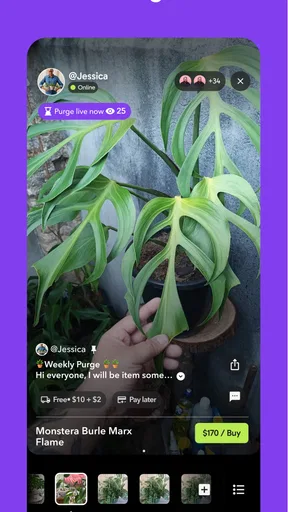
So, what’s the deal with Palmstreet: Buy & Sell LIVE? Picture this: you’re browsing through items in real-time, watching live streams where sellers showcase their products, and if something catches your eye, you can snag it right then and there. It’s like being at an auction but with the comfort of doing it all from your phone.
First things first, you’ll want to download the app from either the App Store or Google Play. Once you’ve got it installed, setting up your account is a breeze. The interface is clean and user-friendly, which makes navigation a cinch even if you’re not super tech-savvy. I found myself getting lost in the app for hours, just scrolling through different live streams and chatting with sellers.
Worth Reading Before You Choose

EA SPORTS FC Mobile 26 Is a Bigger Football Game, but It Takes Time

Flipboard Shows What News Apps Must Do Beyond the Feed

Switching to Android Auto Means Rethinking Your Driving Routine

Google Calendar Makes a Crowded Week Easier to Manage

Ludo King Makes the Most of the Minutes Between Plans

Baby Panda World Brings Quick Play to Modern Phones, but Its Game Library Feels Busy
Features That Stand Out
What sets Palmstreet apart from other shopping apps are its unique features. Here are some that really caught my attention:
- Live Streaming: Sellers go live to showcase their products. You can see items in real-time, which makes the whole experience more transparent and engaging.
- Interactive Chat: Got questions about a product? Just hop into the chat and ask away. Sellers are usually quick to respond, making it feel like you’re really there, interacting face-to-face.
- Instant Purchasing: See something you love? Hit that buy button and it’s yours. No waiting around for auctions to end or for bids to close.
- Notifications: Never miss a deal with customizable notifications that alert you when your favorite sellers go live.
Making a live session useful, not just entertaining
The best way to use a stream is to treat it as a chance to inspect and clarify, not as a substitute for thinking through a purchase. If something interests me, I’d ask a focused question about the particular detail that affects my decision: its condition, dimensions, materials, or how it is used. The live view can add useful context, but it does not remove the need to decide whether the item suits my home, budget, and expectations.
A simple habit helps when browsing casually: decide what you are looking for before a stream starts, even if the answer is only “something for this corner of the room.” That gives you a reason to pause when a relevant item appears and makes it easier to pass on attractive things that do not solve a real need. For a seller you already follow, notifications can help you catch a session; for occasional browsing, I would keep alerts selective so the app does not turn every quiet moment into a shopping prompt.
One realistic use is planning a small home refresh. I might open the app during a break, watch a seller show an item from several angles, and ask a question before deciding whether it works with the space I have in mind. If the answer is unclear or the stream moves on, I can simply leave without treating the moment as a deadline. That balance—using the conversation to learn while keeping control of the decision—is what makes live shopping more useful than merely watching for entertainment.
The live aspect of the app is what really makes it shine. It’s not just about buying and selling; it’s about community and interaction. You can follow your favorite sellers, get to know them, and even build relationships over time. It turns shopping into a social experience, and that’s something you don’t get with your typical e-commerce platform.
Where this format has an edge—and where it doesn’t
Compared with a conventional online marketplace, Palmstreet puts the seller’s presentation and live interaction closer to the centre of the shopping experience. That can be helpful when a product benefits from being shown rather than described in a short listing. Compared with browsing social posts, the ability to ask about an item in the moment makes the experience more directly shopping-focused. Neither comparison means it is automatically better: static listings are easier to scan and compare, while a local store can let you inspect something in person before buying.
The trade-off is attention. A stream may include more conversation and waiting than a shopper who has a specific item in mind wants. I would use Palmstreet for discovery and seller interaction, then use other options when speed, broad comparison, or seeing a product physically matters more. Thinking of it as a complement rather than a universal replacement makes its strengths easier to appreciate.
Why You’ll Love It
For me, the appeal of Palmstreet lies in its ability to make shopping feel personal again. In a world where everything’s becoming automated and impersonal, this app is a breath of fresh air. There’s something exciting about interacting with real people in real-time, and it brings a level of authenticity and trust that’s often missing in online shopping.
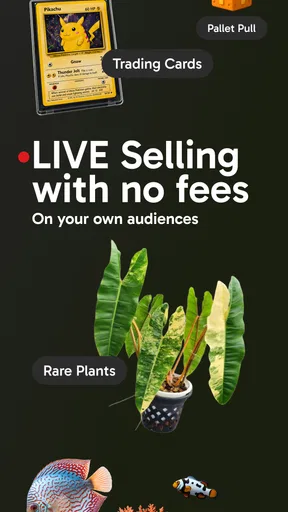
The variety of products is also impressive. Whether you’re into vintage clothes, rare collectibles, or the latest tech gadgets, you’re likely to find something that piques your interest. And because the sellers are live, you can see the condition and quality of items before you buy, reducing the risk of disappointment.
What to check before you commit
Seeing a product on camera can improve your impression of its appearance, but it is not identical to inspecting it yourself. Lighting, camera angle, and the pace of a stream can make details harder to judge. I would not rely on a quick glance for a purchase where exact fit, colour, condition, or a particular specification is essential. Ask the question while the seller is present, and take the time to decide rather than letting the energy of a live session make the choice for you.
It is also worth distinguishing the free app from the cost of shopping through it. Palmstreet is free to download, while in-app purchases range from $2.49 to $49.99 per item; those purchases are separate from the price of anything you choose to buy. I’d check what a transaction is charging before confirming it and avoid assuming that installing the app means every part of using it will be free. The app is on version 8.65.0, and it was released on November 4, 2020, with Android 7.0 as its minimum OS requirement.
A few practical trade-offs
Live video needs a decent internet connection if you want the presentation and conversation to remain easy to follow. If you are on an unreliable connection, a stream may be less useful than a text listing you can inspect at your own pace. The format also favours people who can drop in while sellers are live; anyone who wants every option available whenever they happen to shop may find the timing inconvenient.
There is a learning curve in working out which sellers and sessions match your interests. Following sellers can make later browsing more relevant, but it also means your experience depends partly on who you choose to follow. I would start with a small number whose products or presentation genuinely appeal to me, then adjust from there rather than trying to follow everything. That keeps discovery manageable and makes notifications more meaningful.
For sellers, the appeal is direct presentation and conversation, but that style is not suited to every person or product. If you would rather prepare a listing once and let shoppers find it on their own schedule, a conventional marketplace may feel less demanding. Live selling asks for attention and interaction while the stream is happening. Buyers should likewise remember that a friendly exchange can help answer questions, but it should not replace checking the purchase details and deciding whether the item is right for them.
A Few Things to Keep in Mind
While I’m all in on Palmstreet, it’s not without its quirks. The live nature of the app means you need a decent internet connection to avoid buffering during streams. Also, because it’s a relatively new platform, the number of sellers and variety of products might not be as vast as on some other big-name sites yet.
But honestly, these are small hiccups in the grand scheme of things. The team seems dedicated to improving the app, and I’ve noticed updates rolling out regularly to enhance user experience and add new features.
What switching to live shopping involves
If you already shop through standard listings, there is no need to replace that routine all at once. Keep using your usual option for exact-match searches and comparisons, and try Palmstreet when you want to see a seller present an item or ask a question live. That low-commitment approach lets you learn whether the format suits you without changing how you handle every purchase.
For someone moving from occasional browsing to following sellers, the main adjustment is timing and attention, not learning a complicated shopping method. Choose notifications deliberately, decide in advance what would make an item worth buying, and leave a stream when it no longer serves that purpose. Those small choices help avoid impulse purchases and make the app feel like a tool you control rather than a feed that controls your evening.
Final Thoughts
In conclusion, Palmstreet: Buy & Sell LIVE brings a unique twist to the world of online shopping. It’s immersive, interactive, and downright fun. If you’re someone who misses the personal touch of in-person shopping, or if you just love the thrill of snagging a deal live, then this app deserves a spot on your phone.
Whether you’re a buyer or a seller, Palmstreet offers a dynamic platform that’s sure to shake up your shopping habits. Don’t just take my word for it—give it a try and see for yourself. Happy shopping!
My recommendation
I’d recommend trying it if you enjoy browsing home-related finds through live presentations and want the option to ask sellers questions as you watch. Its 4.7 average and roughly 480 written reviews suggest that many people have taken the time to respond to the app, but ratings alone cannot tell you whether its pace suits you. The clearest test is whether live discovery feels useful after a few sessions.
I would skip it as a primary shopping destination if you need a specific item immediately, dislike video, or prefer a quiet catalogue you can compare at your own speed. For everyone else, it is worth trying as a more social alternative to standard online shopping—while keeping your usual marketplace or local store available for purchases where speed and hands-on inspection matter most.
Pros
- User-friendly interface with intuitive navigation.
- Live auction feature enhances buying experience.
- Real-time notifications for bids and sales.
- Secure payment options ensure safe transactions.
- Wide range of categories to explore.
Cons
- Limited to specific regions for now.
- Occasional app crashes reported by users.
- Customer support response can be slow.
- Requires stable internet for optimal use.
- Some items have high shipping costs.
FAQs for Palmstreet: Buy & Sell LIVE
What is Palmstreet: Buy & Sell LIVE?
Palmstreet: Buy & Sell LIVE is an innovative app designed for users to engage in real-time buying and selling of various products. It provides a platform where sellers can host live auctions or sales, and buyers can interact and bid instantly. This dynamic marketplace aims to enhance the shopping experience with live interactions.
How does the live selling feature work on Palmstreet?
The live selling feature allows sellers to broadcast live video sessions where they showcase their products. Buyers can view these live streams, ask questions, and make purchases in real time. This feature creates an engaging environment reminiscent of live auctions, allowing for instant interaction and decision-making.
Is Palmstreet safe for transactions?
Yes, Palmstreet implements several security measures to ensure safe transactions between buyers and sellers. It employs secure payment gateways and offers dispute resolution services. Users are encouraged to follow the app’s guidelines for secure trading, such as verifying sellers and reading reviews before making purchases.
What types of products can I buy or sell on Palmstreet?
Palmstreet supports a wide range of product categories, from fashion and electronics to home goods and collectibles. Sellers can list almost any item that complies with the platform’s guidelines, making it a versatile marketplace for diverse interests and needs. Frequent updates ensure a fresh and dynamic inventory.
Does Palmstreet charge fees for using the app?
Palmstreet may charge fees for certain transactions, such as listing products or final sale fees. The fee structure is designed to be competitive and is clearly outlined in the app’s terms of service. Users are advised to review these terms to understand any costs associated with buying or selling on the platform.


